Looking for a wireless token display system in India? Show queue numbers on any TV without expensive LED boards. ATS cloud token display system.
If you run a restaurant, canteen, hospital OPD, bank, or any counter-service business in India, you have faced this problem: order number 47 is ready — and nobody hears you. You shout. The customer at the back does not hear. The counter staff shout again. Customers crowd the counter. Chaos.
The traditional solution was an LED token display board — a hardware unit installed on the wall showing the current token number. It worked, but it was expensive, rigid, required special installation, and could not be moved or reconfigured without cost.
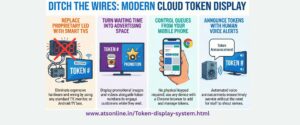
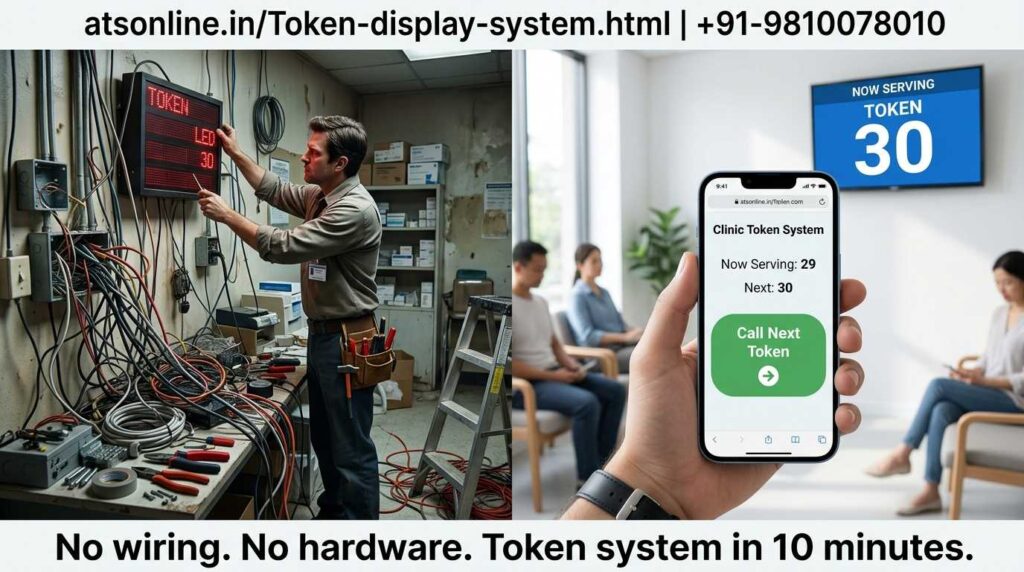
There is now a far better option: a wireless cloud-based token display system that turns any ordinary TV, monitor, or screen into a live token display — with voice announcements, branding, and real-time updates. No LED board. No special hardware. No electrician. Just a TV you already own and the ATS Wireless Token Display System.
ATS has installed wireless token display systems in restaurants, canteens, hospitals, banks, clinics, pharmacies, and government offices across India. This guide covers everything you need to know before buying one.
| Quick summary: The ATS Wireless Token Display System lets you display order/token numbers on any TV or monitor in real time — with voice announcements, custom branding, and cloud control. No LED board, no special wiring, no IT team needed. |
| In This Guide 1. What Is a Wireless Token Display System? 2. How It Works — From Token Issue to Display 3. Wireless Token Display vs Traditional LED Board 4. Key Features of the ATS Token Display System 5. Who Needs a Token Display System? 6. Industries & Use Cases Across India 7. How Much Does It Cost? 8. ATS Wireless Token Display System: Full Overview 9. Frequently Asked Questions 10. How to Get Started |
1. What Is a Wireless Token Display System?
A wireless token display system is a software-based queue management solution that displays token or order numbers on any screen — TV, monitor, projector, or digital signage display — in real time, without any dedicated LED hardware.
The system has two parts working together: a counter terminal (where staff issue and call tokens) and a display screen (any TV connected to a device running the display software). When a staff member calls the next token, the number instantly updates on the display — along with a voice announcement.
Here is what makes the ATS system different from traditional token displays:
| Traditional LED Board | ATS Wireless Token System | |
| Display hardware | Dedicated LED board — fixed, expensive | Any TV or monitor you already own |
| Installation | Electrician, wiring, wall mounting | Plug device into TV — done in minutes |
| Voice announcement | Basic buzzer only (most models) | Clear voice calls token number aloud |
| Branding / appearance | Fixed display — no customisation | Custom logo, colours, background |
| Multiple screens | New LED board for each screen — costly | Add any number of TVs on same system |
| Control location | Fixed counter only | Control from any device on network |
| Cloud access | Not available | Monitor from anywhere — phone/laptop |
| Cost | ₹8,000–₹30,000+ per board | ₹2,950 one-time for software |
| Reposition display | Re-wiring required | Just move the TV |
2. How It Works — From Token Issue to Display
The system is straightforward. Here is the complete flow from a customer arriving to their token being called:
Step 1 — Customer Receives a Token Number
When a customer arrives, they receive a token number — either from a printed token slip, a counter staff member, or a self-service token kiosk. The token number is entered into the ATS counter terminal — a simple interface running on any computer, tablet, or Android device at the service counter.
Step 2 — Customer Waits and Watches the Display
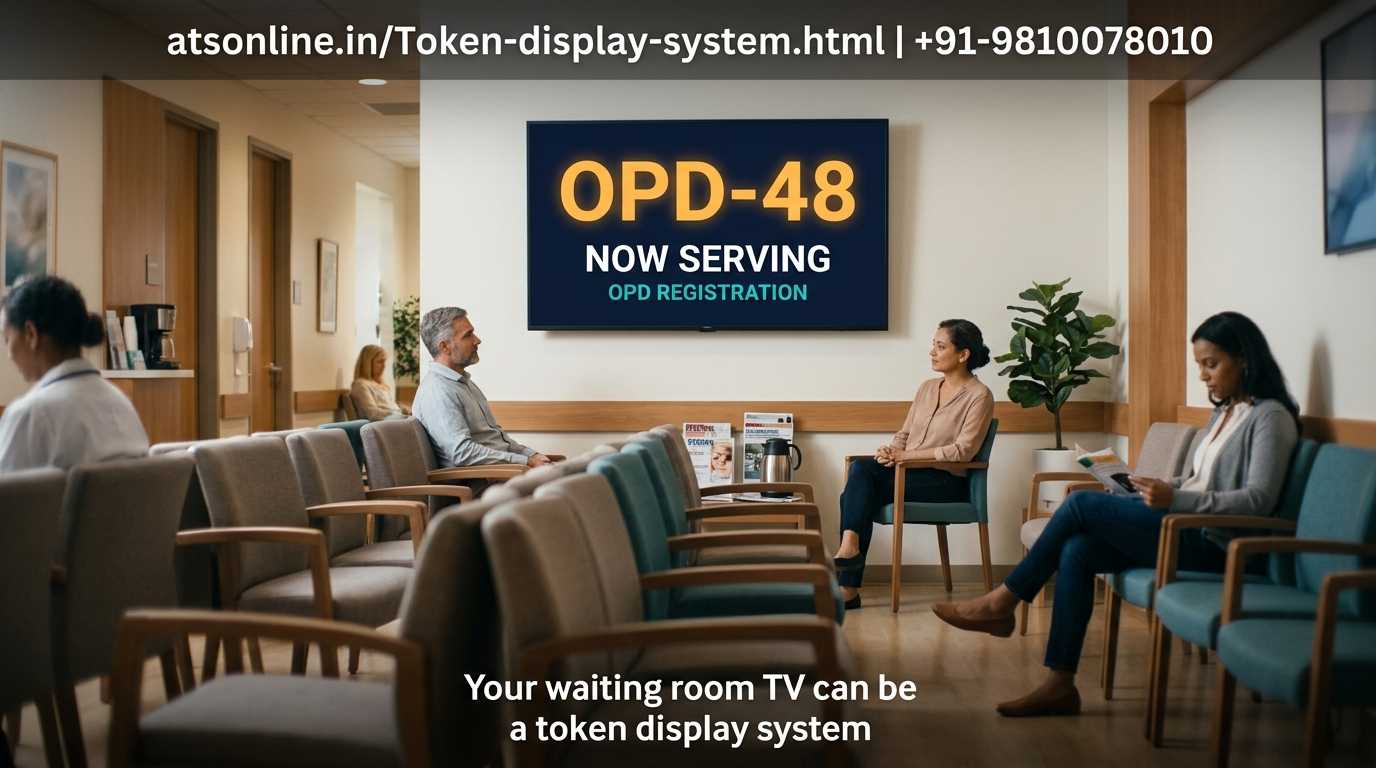
The TV display mounted in the waiting area shows the currently serving token number — updated in real time. Customers can see at a glance how many tokens are ahead of them. No need to crowd the counter or ask staff.
Step 3 — Staff Calls the Next Token
When ready to serve the next customer, the counter staff clicks ‘Next’ on the terminal. The display instantly updates to the new token number — and a voice announcement plays: ‘Token number forty-eight, please proceed to counter one.’ Clear, audible, and automatic.
Step 4 — Multiple Counters, One Display
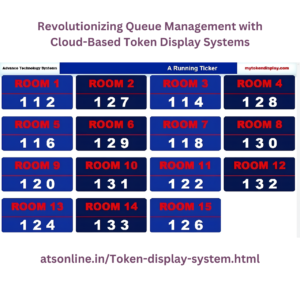
If you have multiple service counters, the display can show all counters simultaneously — ‘Counter 1: Token 48 | Counter 2: Token 31 | Counter 3: Token 19’. Each counter staff member controls their own token independently from their terminal.
Step 5 — Manager Monitors From Anywhere
Because the system is cloud-based, the manager can monitor queue status, average wait times, and tokens served — from a phone or laptop, even if they are not at the counter location.
| Real-world result: Businesses that switch from shouting order numbers to the ATS Wireless Token Display System report a 30–40% reduction in customer complaints about waiting, and counter staff report significantly less stress during peak hours. |
3. Wireless Token Display vs Traditional LED Board: Detailed Comparison
Many businesses in India still buy dedicated LED token display boards. Here is a detailed breakdown of why the ATS wireless system is a smarter investment:
| Comparison Point | LED Token Board | ATS Wireless System |
| Purchase cost | ₹8,000–₹30,000 per board | ₹2,950 one-time (software only) |
| Display hardware | Must buy dedicated LED board | Use any existing TV — free |
| Installation effort | Electrician, wiring, 1–2 days | Self-setup in 30 minutes |
| Number of screens | Pay for each new board | Add any TV — no extra cost |
| Voice announcement | Limited or buzzer only | Clear voice reads token number |
| Custom branding | Not possible — fixed display | Logo, colour, background customisable |
| Software updates | Hardware replacement required | Automatic cloud updates |
| Remote monitoring | Not available | Cloud dashboard on phone/laptop |
| Portability | Fixed to wall — cannot move easily | Move the TV anywhere in minutes |
| Multi-counter display | Separate board per counter area | All counters on one screen |
| Maintenance | Hardware failure = business disruption | Software-based — update and restart |
| 5-year total cost (3 boards) | ₹24,000–₹90,000 | ₹2,950 (one-time, forever) |
The cost difference alone makes this a clear decision for most businesses. A single LED board costs more than the entire ATS software — and the ATS system can drive unlimited screens.
4. Key Features of the ATS Wireless Token Display System
Here is a closer look at what makes the ATS token system stand apart from basic token display alternatives:
Display on Any TV or Monitor
The ATS display software runs on any screen — LED TV, LCD monitor, projector, or digital signage panel. Connect a low-cost Android TV stick, a Raspberry Pi, or a desktop PC to your existing TV and the display is live. You do not need to buy any specialised hardware.
Voice Announcement
When a token number is called, the system announces it aloud in a clear, natural voice — ‘Token number forty-eight, please proceed to counter one.’ This is critical for waiting areas where customers may not be watching the screen constantly. Supports multiple Indian language options.
Multi-Counter Support on One Screen
If your business has 2, 3, or 5 service counters, all can be displayed simultaneously on one screen. Each counter shows its current token number independently. Customers immediately see which counter to proceed to — no confusion.
Custom Branding
The display screen can be configured with your business name, logo, and brand colours. Instead of a generic number display, your customers see a professional, branded waiting screen. This is particularly valuable for hospitals, banks, and premium restaurants.
Cloud-Based Control
The system is cloud-managed — counter staff control tokens from their terminal and the display updates in real time on any screen connected to the system. Managers can monitor queue status remotely from a phone or laptop.
Repeat Announcement
If a customer does not respond to the first announcement, staff can click ‘Repeat’ to announce the token number again — without manually calling out. Reduces counter staff fatigue significantly during long shifts.
Token History & Reports
The system maintains a log of all tokens issued, called, and served — with timestamps. Managers can review average wait times, peak hour data, and counter-wise efficiency reports. Useful for staffing decisions.
5. Who Needs a Token Display System?
Any business where customers wait for service — and where they need to know when it is their turn — benefits from a token display system. Here are the clearest use cases:
| Business Type | The Problem They Face | How Token Display Solves It |
| Restaurant / QSR | Customers crowd the counter asking ‘is my order ready?’ | Token number on TV — no crowding, no noise |
| Hospital / Clinic OPD | Patients anxious about their turn — staff repeatedly asked | Token display with voice — orderly, calm waiting area |
| Bank / Financial Office | Multiple service windows — customers unsure which counter to go | Counter-wise display — clear direction for each customer |
| Government Office | Chaotic queues — people pushing, repeated verbal calling | Systematic token queue — fair and orderly |
| Canteen / Food Court | Food ready orders lost in the noise of a busy canteen | Order number on TV with voice — customer collects calmly |
| Pharmacy / Medical Shop | Prescriptions ready but customer not called efficiently | Token display reduces over-the-counter crowding |
| Service Centre / Garage | Customers waiting for vehicle — no visibility on status | Token system shows whose vehicle is ready |
| Salon / Spa | Walk-in queue management — no appointment system | Token numbers manage walk-in order fairly |
| Telecom / Service Store | Multiple counters, different services — confusion on which queue | Counter-wise display sorts customers automatically |
6. Industries & Use Cases Across India
The ATS Wireless Token Display System is already deployed across a wide range of Indian industries. Here is how different sectors use it:
Restaurants and QSR Counters
In a fast-food or counter-service restaurant, customers receive a token slip when they order. They sit down and wait. When the order is ready, the token number appears on the TV with a voice announcement — ‘Order number 47 is ready’. The customer collects their food. Counter staff are freed from shouting. The dining area is quieter and more pleasant.
Hospitals and OPD Queues
Hospitals are one of the highest-need environments for token systems. Patients waiting for OPD consultations, lab reports, pharmacy counters, or billing — all benefit from a visible, voice-announced queue system. It reduces anxiety, prevents pushing, and allows patients to sit comfortably until their number is called.
Banks and Financial Institutions
Banks use multi-counter token systems where each service window has its own token sequence. The ATS system displays all counters simultaneously — ‘Counter 1: Token 12 | Counter 2: Token 7 | Counter 3: Token 19’. Customers proceed to the right counter immediately without asking.
Corporate Canteens
Large corporate canteens serving hundreds of employees at lunch use token systems to manage food counter queues. When a meal is ready at the counter, the token number is called. Employees collect their food without clustering around the counter.
Government Offices and Tehsils
Token display systems in government offices — ration shops, registration offices, pension counters — have transformed previously chaotic service environments into orderly queues. The visible, impartial system prevents queue-jumping and reduces staff arguments with the public.
| Scale note: The ATS Wireless Token Display System supports any number of counters and any number of display screens — all managed from one system. A hospital with 8 OPD counters and 3 display screens in different waiting areas runs the entire setup on one ATS installation. |
7. How Much Does a Wireless Token Display System Cost in India?
ATS Wireless Token / Queue Display System is available on atsonline.in at ₹2,950 — one-time price. This is the software cost. There are no monthly subscriptions and no per-token fees.
What is included in ₹2,950:
- Complete token display software — counter terminal + display screen module
- Unlimited token numbers — no per-token charges
- Multi-counter support — all counters on one system
- Voice announcement module
- Custom branding — business name on display
- Cloud-based management dashboard
- Token history and wait-time reports
- Works on local network even without internet
- Software updates included
What you need additionally (hardware — most businesses already have these):
- A TV or monitor for the display (any size — you likely already have one)
- An Android TV stick, Chromecast, or small PC to connect to the TV — ₹1,000–₹3,000
- A computer, tablet, or Android device at the counter for the terminal — usually already available
- Wi-Fi or LAN network connecting counter and display (standard setup in most offices)
| Setup Type | Estimated Total Investment |
| Basic (1 counter, 1 TV display) | ₹2,950 software + ₹1,500 Android stick = ~₹4,500 |
| Standard (3 counters, 1–2 displays) | ₹2,950 software + existing TVs + ₹3,000–₹6,000 devices = ~₹6,000–₹9,000 |
| Enterprise (5+ counters, 3+ displays) | ₹2,950 software + hardware for displays = ₹8,000–₹20,000 total |
| Traditional LED boards (equivalent) | ₹8,000–₹30,000 per board × number of locations |
| At ₹2,950 for the software, the ATS Wireless Token Display System is the most affordable professional queue management solution available in India. Most businesses recoup this in the first week through reduced staff time spent on manually calling customers. |
| Display Token Numbers on Any TV — Starting at ₹2,950 ATS Wireless Token Display System — one-time price, works on any TV, voice announcements, cloud control. ₹ 2,950 (Yearly) >> Buy Now on atsonline.in | |
You can reach us by phone at +91 9810078010 or by email at ats.fnb@gmail.com. Thank you for your interest in our services.
8. ATS Wireless Token Display System: Full Feature Overview
ATS has been building display and queue management solutions for Indian businesses across restaurants, hospitals, banks, canteens, government offices, and service centres. The wireless token system is used in hundreds of locations pan-India.
| Feature | ATS Capability |
| Display Hardware | Any TV, monitor, or screen — no dedicated board |
| Counter Terminal | Any PC, laptop, tablet, or Android device |
| Voice Announcement | Clear voice reads token number + counter |
| Multi-Counter Support | Unlimited counters on one system |
| Multi-Screen Display | Any number of TVs on same system |
| Custom Branding | business name |
| Cloud Management | Monitor and control from any device, anywhere |
| Local Network Mode | Works on LAN/Wi-Fi even without internet |
| Repeat Announcement | Re-call any token with one click |
| Token History & Reports | Wait times, tokens served, counter efficiency |
| Display Layout Options | Full-screen number, split-counter view, ticker |
| Language Support | English + regional Indian language announcements |
| Pricing | ₹2,950 Yearly |
| Setup Time | Under 30 minutes — self-setup or ATS support |
| Support | Pan-India support team |
You can reach us by phone at +91 9810078010 or by email at ats.fnb@gmail.com. Thank you for your interest in our services.
9. Frequently Asked Questions
Do I need to buy a special TV or display board?
No. The ATS Wireless Token Display System works on any TV, monitor, or screen you already own. You simply connect a low-cost Android TV stick or a small PC to your existing TV and run the display software on it. No special hardware purchase is required for the display.
How does the voice announcement work?
When counter staff click ‘Next Token’ on their terminal, the system automatically plays a voice announcement through the TV’s speakers — for example, ‘Token number forty-eight, please proceed to counter one.’ The voice is clear and natural. You can adjust the volume and repeat the announcement with one click.
Can I show multiple counters on one TV screen?
Yes. The display screen can show all counters simultaneously — Counter 1, Counter 2, Counter 3 and their respective current token numbers, all on one screen. Each counter staff member controls their own token number independently.
Can I add my business logo and branding to the display screen?
No. Businesses can show their brand name above the token numbers.
How many screens and counters can the system support?
The ATS system supports unlimited counters and unlimited display screens with additional charges on a single installation. A large hospital with 8 OPD counters and display screens in three different waiting areas can run the entire setup on one ATS system.
How long does setup take?
For a basic one-counter, one-display setup, installation takes under 30 minutes — connect the display device to the TV, install the software, and configure counter names. Larger multi-counter setups take 1–2 hours. ATS provides remote setup support if needed.
10. How to Get Started
Setting up the ATS Wireless Token Display System at your business is straightforward. Here is what to do:
- Visit the ATS Wireless Token Display System product page on atsonline.in. Review the features and pricing — it is a one-time purchase at ₹2,950.
- Check your existing hardware — do you have a TV or monitor available for the display? A computer or Android tablet at the service counter? This is usually enough to get started.
- Purchase on atsonline.in — immediate access to the software after payment.
- Connect your display device — plug an Android TV stick or small PC into your TV’s HDMI port and install the ATS display module.
- Install the counter terminal software — on the computer or tablet at your service counter.
- Configure and go live — set counter names, upload your logo, adjust voice settings, and you are live. Total setup time: under 30 minutes for a basic setup.
| ATS Wireless Token / Queue Display System Any TV • Voice announcements • Multi-counter • Custom branding • Cloud control ₹ 2,950 yearly >> Purchase at atsonline.in | Call for a Free Demo |
About ATS: Advance Technology Systems (ATS) builds POS, queue management, display, and billing software for Indian businesses across hospitality, healthcare, retail, and government sectors. Visit atsonline.in for the full product range or labhak.com to purchase online.
You can reach us by phone at +91 9810078010 or by email at ats.fnb@gmail.com. Thank you for your interest in our services.